

1. What are Color Codes in Minecraft?
In Minecraft, color codes (also known as formatting codes) are a special symbol system. By adding specific character and code combinations before text, you can change the display color and style of the text. This system is based on the section symbol (§) or the ampersand symbol (&) and can be applied in various contexts such as the chat bar, signs, item names, and world names.
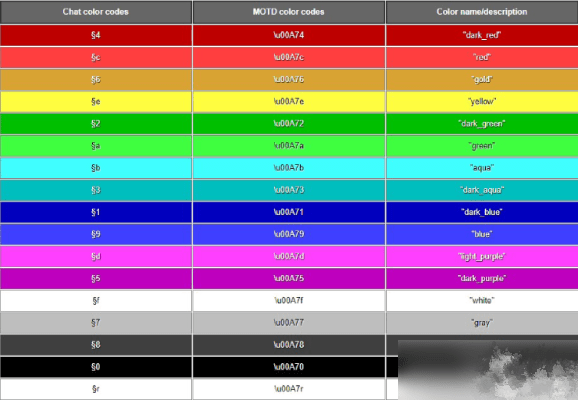
2. What are the Basic Color Codes?
Common Color Code Table:
§0/&0: Black
§1/&1: Dark Blue
§2/&2: Dark Green
§3/&3: Aqua
§4/&4: Red
§5/&5: Dark Purple
§6/&6: Gold
§7/&7: Light Gray
§8/&8: Dark Gray
§9/&9: Light Purple
§a/&a: Light Green
§b/&b: Light Blue
§c/&c: Light Red
§d/&d: Pink
§e/&e: Yellow
§f/&f: White
3. How to Input Color Codes on Various Platforms?
Windows System: Hold the Alt key and type 0167 or 41452 on the numeric keypad.
macOS System: Press the Option+6 key combination.
Linux System: Press Compose+S+O.
Mobile Devices: Usually requires input via third-party input methods or copy-paste.
4. What are the Formatting Style Codes?
In addition to colors, you can add text styles with the following codes:
§l/&l: Bold Text
§m/&m: Italic Text
§n/&n: Underline
§o/&o: ~~Strikethrough~~
§r/&r: Reset to Normal Style
5. How to Use Colored Fonts in Chat?
Simply type the color code followed immediately by the text in the chat bar to achieve colored chat text. For example, typing “aHello Everyone” will display the text in green. This method is straightforward and the most commonly used way for players to implement colored fonts.
6. How to Use Colored Text on Signs?
Signs support color code display. Players can directly input text with color codes when placing a sign. Colored text on signs can significantly enhance the identification and aesthetics of a build.
7. How to Change Font Color Using Commands?
7.1 Using the /title Command
Basic Format: /title@atitle§
Example: /title@atitle§c Warning: Monsters Incoming! will display a red title warning to all players.
7.2 Using the /tellraw Command
This command, combined with JSON format, can create complex colored text effects:
/tellraw@a[{“text”§a§lWelcome to My Home!”}]
This command will display bright green, bold welcome text to all players.
8. How to Use Colored Fonts on Item Names?
When renaming an item using an Anvil, add a color code before the name to change the item name’s color. For example, renaming a sword to “§6King’s Sword” will display a golden weapon name.
9. How Can Command Blocks Change Name Colors?
Follow these steps to achieve automatic color-changing effects for player names:
1. Create a team named “1”: /scoreboardteamsadd1
2. Set the team color: /scoreboardteamsoption1colorgreen 1 color green
3. Add a player to the team: /scoreboardteamsjoin1@p
10. What is JSON Format Color Code Application?
The JSON format provides more powerful control over colored text. For example:
/give@pminecraft:sign10{BlockEntityTag:{Text1:”§a§lClick Here”,”clickEvent”run_command”valuesay Hello!”}}}
This complex command will create a sign with colored, clickable text.
11. Common Color Code Usage Issues
11.1 Codes Not Working
Ensure the correct symbol (§ or &) is used and that the code immediately follows the symbol with no spaces in between.
11.2 Garbled Display
In some cases, garbled text may appear, usually due to system encoding issues or mod conflicts. Try using a font repair mod to resolve this.
11.3 Platform Differences
Bedrock Edition and Java Edition have slight differences in color code support. Players need to choose the appropriate method based on their game version.
12. Advanced Application Techniques
12.1 Color and Style Stacking
You can use color codes and style codes simultaneously to create richer effects, such as “§c§lImportant Notice” displaying as red, bold text.
12.2 Dynamic Color Switching
By combining redstone circuits with multiple command blocks, you can achieve automatic text color switching effects to create dynamic displays.
12.3 Cross-Platform Compatibility
To ensure colored fonts display correctly on different devices, it’s recommended to use the most basic color codes and avoid overly special style combinations.
13. Practical Application Examples
Server Welcome Messages: Use the /tellraw command to create colorful login welcome messages.
Building Labels: Use different colors on signs to label area functions.
Item Categorization: Use different colored item names for quick identification in storage systems.
Game Storytelling: Utilize colored text to enhance the narrative effect in adventure maps.


